
Templates
A template remembers which indicators are on and with which settings. Handy for switching between tasks: “looking at positions”, “looking at trade flow”, “looking at clusters”.
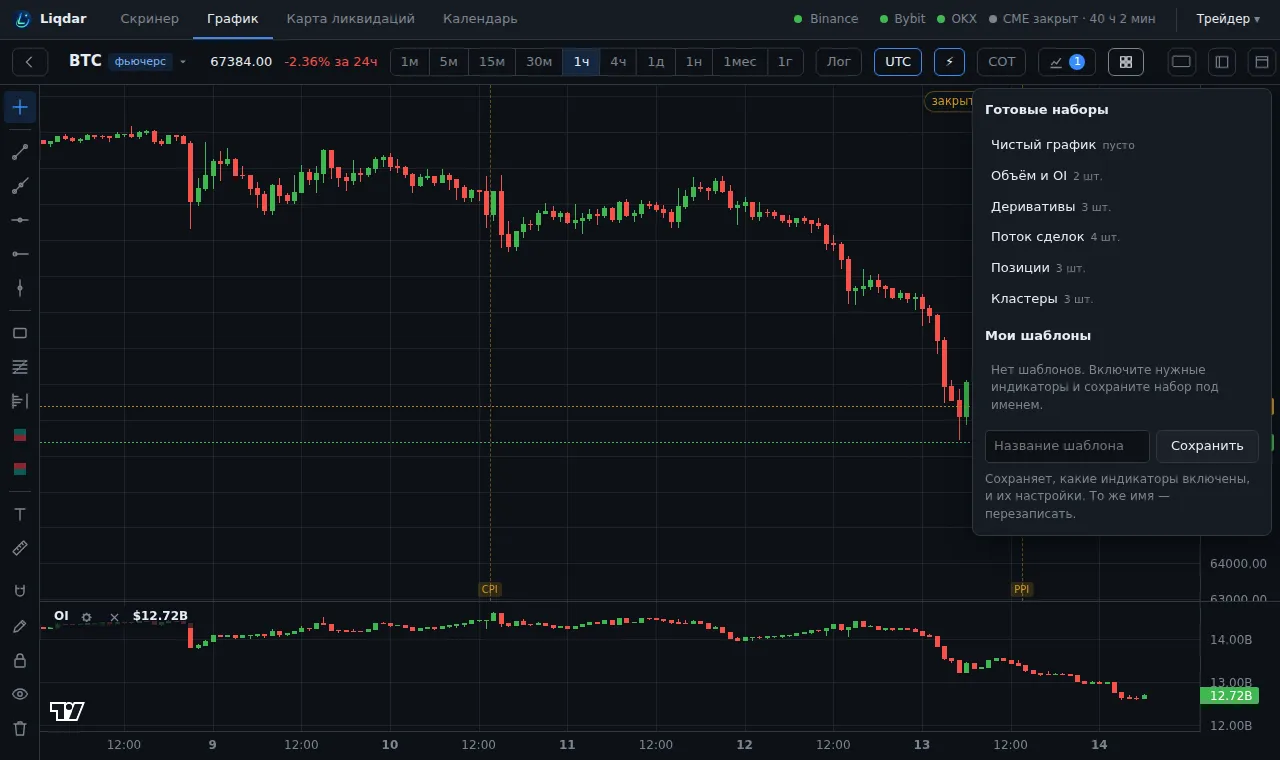
Ready-made sets
Section titled “Ready-made sets”| Set | What it turns on | What for |
|---|---|---|
| Clean chart («Чистый график») | candles only | drawing levels with nothing in the way |
| Volume and OI («Объём и OI») | Volume, Open interest | a first look: is new money coming in |
| Derivatives («Деривативы») | Open interest, Funding, Liquidations | crowd skew, overheating, flushes |
| Trade flow («Поток сделок») | Volume, Net Delta, Taker volume, Taker trades | who is pushing with market orders right now |
| Positions («Позиции») | Open interest, Net Longs, Net Shorts | who is adding and who is closing |
| Clusters («Кластеры») | Clusters, Side volume, Net Delta | volume at prices inside the candles |
A ready-made set only changes which indicators are on. Each indicator’s settings stay yours.
Your own template
Section titled “Your own template”- Turn on the indicators you want and set them up.
- Open Templates («Шаблоны»), type a name in the field at the bottom and press Save («Сохранить»).
- The template appears under My templates («Мои шаблоны»). Clicking it turns on the whole set.
Saving under the same name overwrites the template. Each template shows how many indicators it has, and a delete button.