
Crypto screener: table and sorting
The Liqdar screener is a crypto screener for all Binance perpetual futures (USDT) and spot pairs: live prices, open interest, funding, whales and other money-flow metrics in one table. Besides crypto it covers stocks, gold, oil and other Binance TradFi contracts.
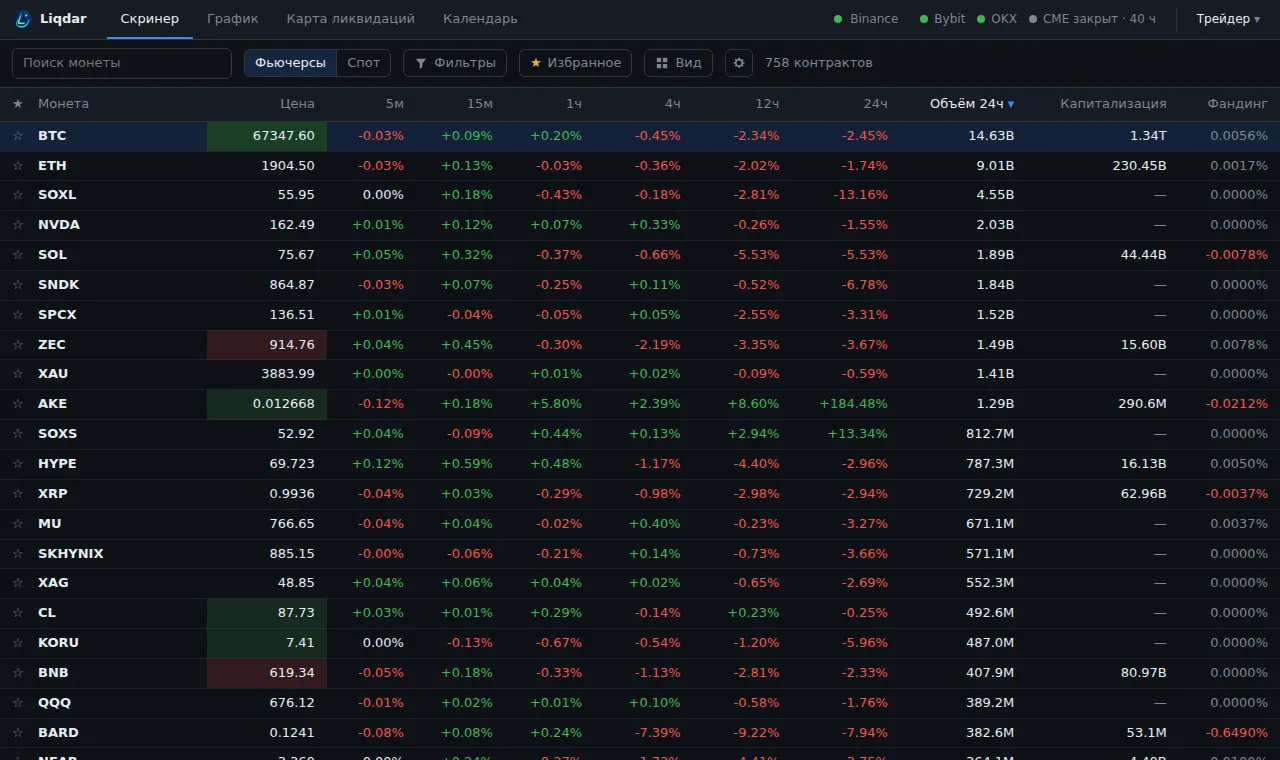
Markets and groups
Section titled “Markets and groups”- Futures / Spot («Фьючерсы / Спот»): the market switch.
- Futures groups: Crypto («Крипта»), Stocks («Акции»), Metals («Металлы»), Gas/oil («Газ/нефть»): Binance TradFi contracts.
- The counter on the right shows how many rows are left after filters (“N of M”).
Where the numbers come from
Section titled “Where the numbers come from”| Data | Source |
|---|---|
| Price, volume, trades, L/S | Binance, in real time |
| Open interest | sum of Binance, Bybit and OKX |
| Market cap, rank | CoinGecko |
| Whales, smart traders | Binance Smart Signal |
| Korean listings and warnings | Upbit, Bithumb |
Sorting and search
Section titled “Sorting and search”- Clicking a column header sorts by it, clicking again flips the direction.
- Coin search («Поиск монеты») finds a ticker. ↑ ↓ move the selection, Enter opens the chart.
- ☆ next to a coin adds it to favourites; the Favourites («Избранное») button keeps only marked coins.
Open a chart
Section titled “Open a chart”Click a row or press Enter. On the chart ↑ ↓ step through neighbouring coins in the screener’s order; Esc or the Screener button takes you back.
Change columns
Section titled “Change columns”Changes are counted over several periods at once, and each has its own column: for example, Price change has 5m, 15m, 1h, 4h, 12h and 24h. Which periods to show is chosen in the columns. Sorting by the 1h column shows what moved most over the last hour.